 Mailroom
Your mail,
on your Mac. Nothing in between.
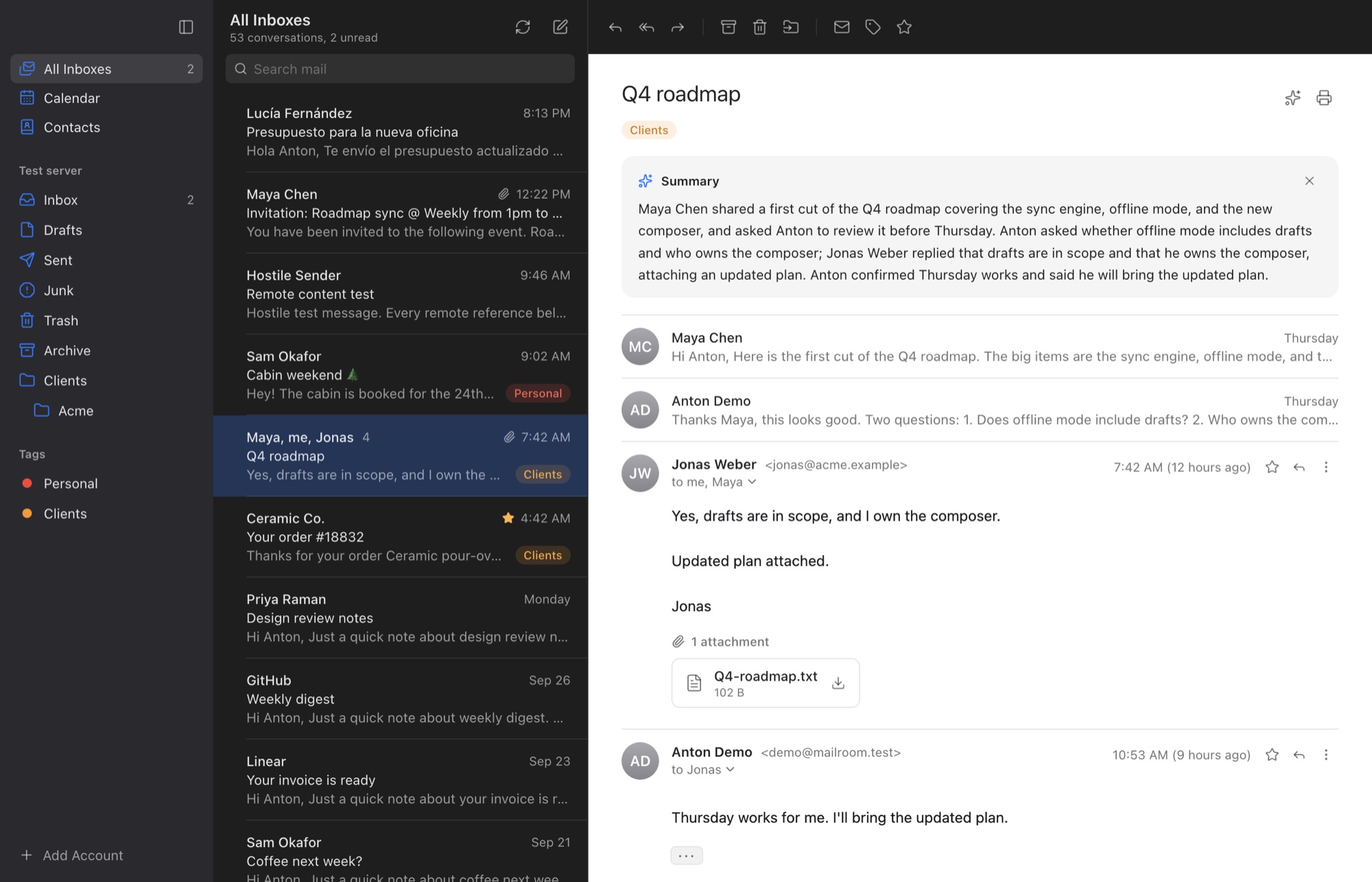
Mailroom brings Gmail-style conversations to any email account, with a calendar and contacts built in. There’s no Mailroom account and no Mailroom server, and it’s free.
macOS 13 or later · Apple silicon and Intel
Made for the keyboard
Gmail’s shortcuts like j, k, e and r, plus the Mac shortcuts you know. Turn the single-key ones off if you’d rather not.
Private by design
Your Mac talks straight to your mail provider. Remote images stay blocked, each message opens in a sandbox, and the local copy is encrypted.
AI when you ask
Draft replies, translate and summarize with the model you choose: one on OpenRouter, or one running on your own Mac with Ollama.
Accounts
Every account, one inbox
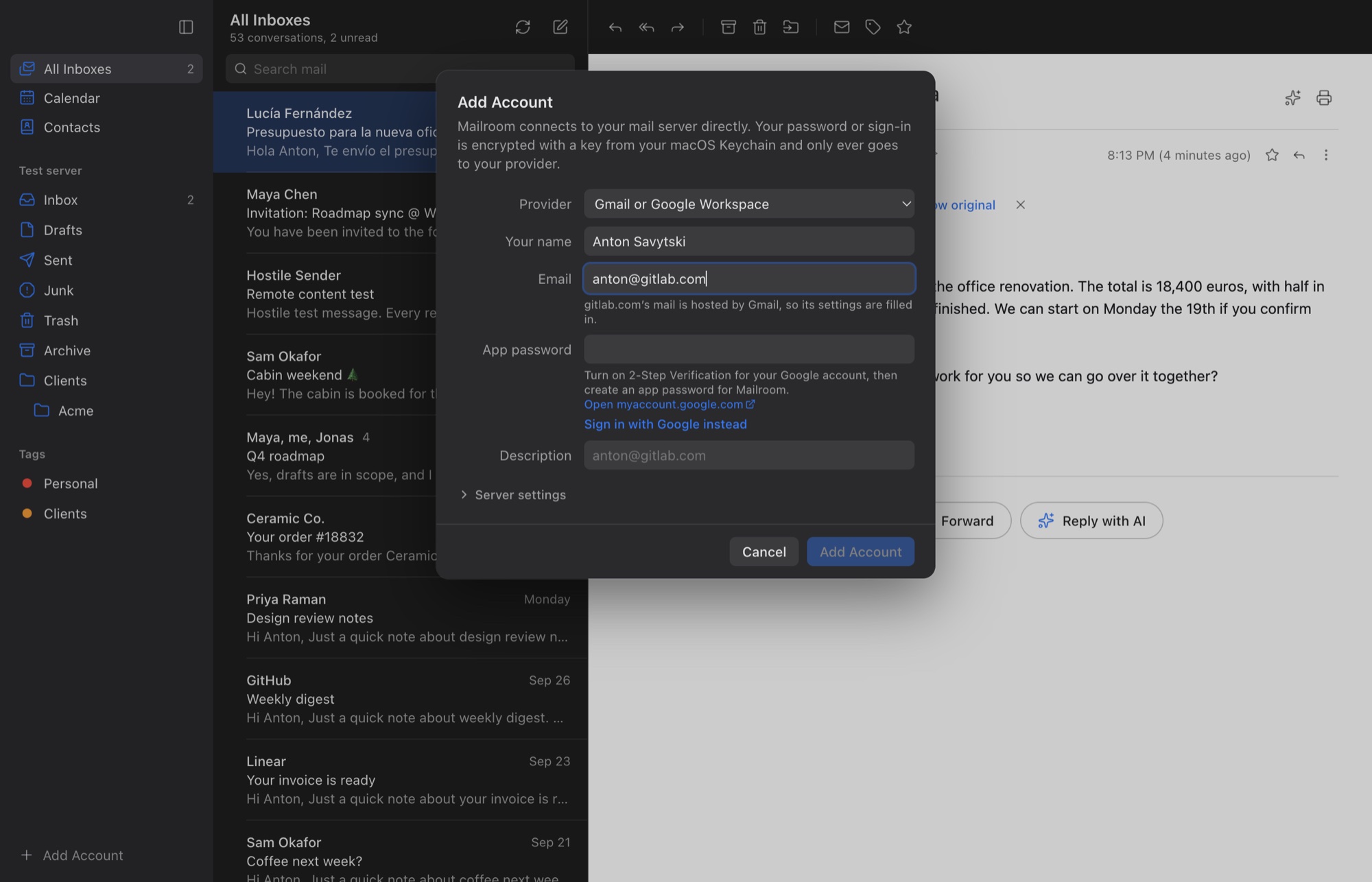
Gmail, Outlook, Microsoft 365, Yahoo, iCloud, Fastmail, Purelymail, Proton Mail Bridge or any IMAP server. Type your address and Mailroom finds the settings, even for your own domain.
- One inbox for all your accounts, with new mail pushed as it arrives
- Sign in with an app password, or with Google, Microsoft or Yahoo through an app you register with them (Mailroom shows how)
- Read and unread, stars, folders and drafts stay in step with your phone
Reading
Read anything, in your language
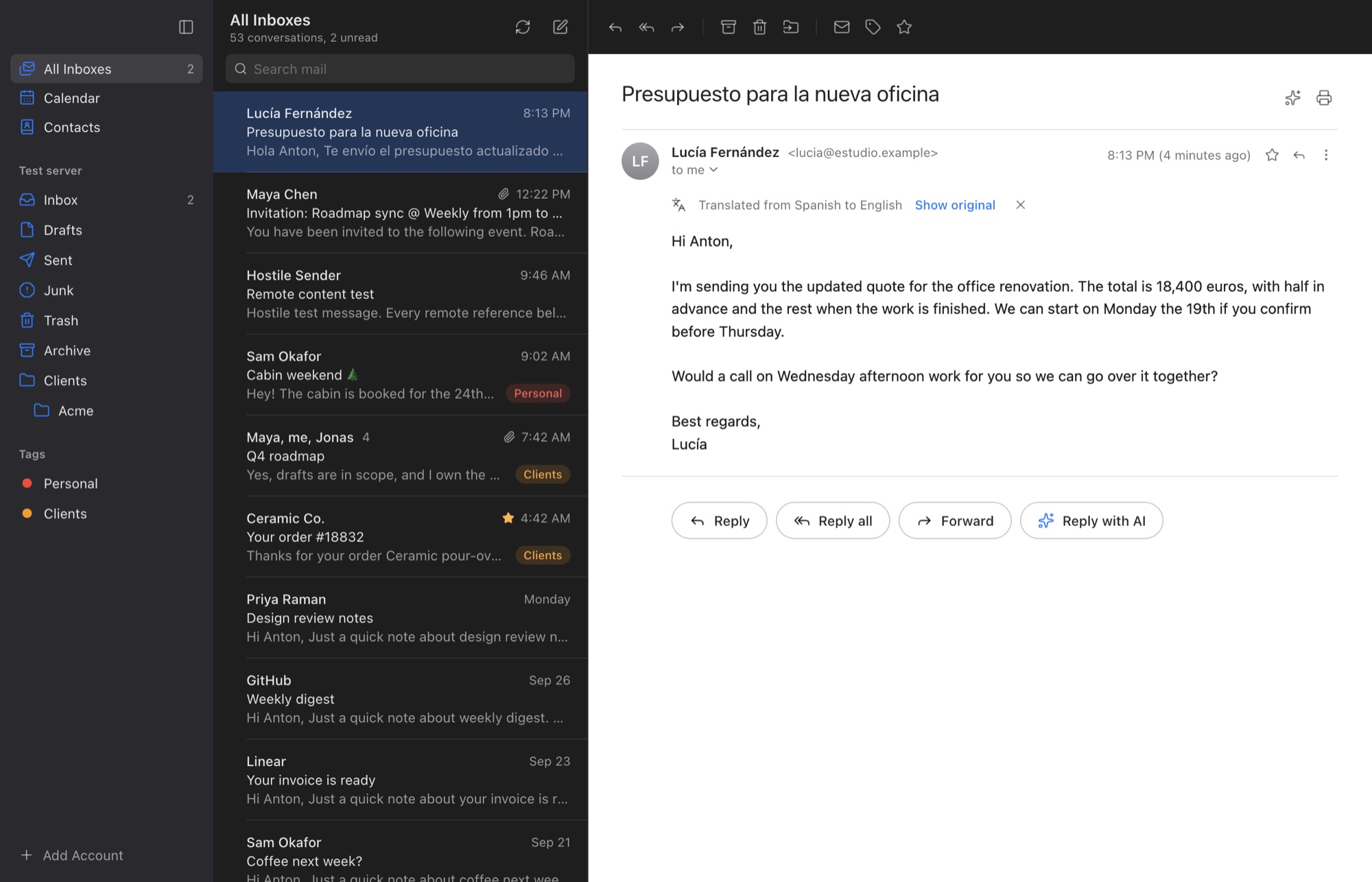
With AI set up, a message in another language gets a Translate link, and Summarize turns a long thread into a few sentences on what was decided and what’s still open.
- Translations replace the message, with Show original one click away
- Summaries in a few sentences, at the top of the conversation
- Replies drafted in the sender’s language, for you to edit and send
Calendar and contacts
Your week, next to your mail
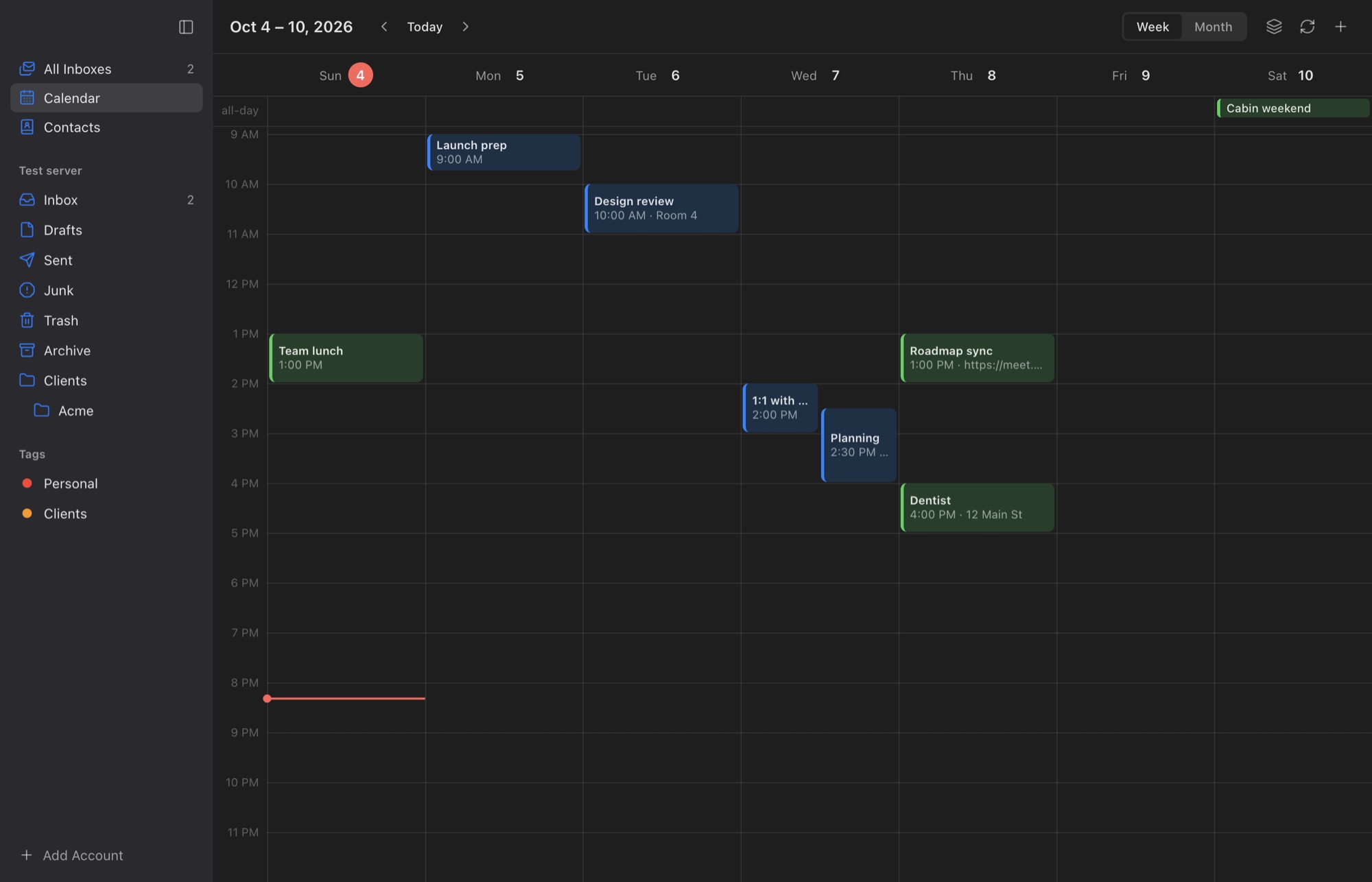
Week and month views over CalDAV, with invitations you can answer right from the message. Contacts sync with your provider’s address book, or stay on your Mac.
- Invite people to your events; their answers come back into your calendar
- For calendars on iCloud, Fastmail, Purelymail and other CalDAV servers
- The people you write to come first when you type an address
Also in Mailroom
Undo Send
Take a message back for up to 30 seconds after you click Send.
Undo for archive, delete and move
Each gives you a few seconds to change your mind, even across a whole selection.
Works offline
Search your mail, and read anything already downloaded, without a connection. Your changes wait and go out in order.
Search that understands
from:, subject:, has:attachment and is:unread, answered on your Mac in milliseconds.
Notifications you control
New mail arrives as it’s sent. Get notified for everything, only for your contacts, or not at all.
Tags that stay with your mail
Where your server allows it, tags are saved with your mail, so they survive a reinstall and show up in Mailroom on your other Macs.
Signatures
An HTML signature for each account, on new mail and, if you like, on replies.
Print and PDF
Print a message or a whole conversation, or save it as a PDF.
One-click unsubscribe
Leave a mailing list from the message itself, in the way the list supports.
Phishing warnings
Links that hide where they go, and senders your provider couldn’t confirm, are flagged.
Make it yours
Light or dark, an accent colour, text size, and a compact list if you like it dense.
Attachments, safely
Preview with Quick Look, save where you choose, and never run what arrives by mail.
Privacy
Private by design
No Mailroom account, no Mailroom server and no analytics. Here’s what happens to your mail.
Straight to your provider
Mailroom connects your Mac directly to your mail, calendar and contacts servers, over encrypted connections.
No tracking pixels
Remote images stay blocked until you allow them, so senders can’t see when you read their mail.
Each message in a sandbox
Email is cleaned and shown with no scripts, no forms and no access to the rest of the app.
Encrypted on your Mac
The local copy of your mail is encrypted with a key kept in your macOS Keychain, and so are your passwords.
AI only when you click
Nothing goes to an AI model unless you ask. With a model on your own Mac, it never leaves it.
No analytics, no ads
Mailroom doesn’t collect usage data or crash reports. This site doesn’t use cookies either.
Questions
Something else? Write to hello@anatolilabs.com.
Is Mailroom really free?
Yes. There’s no subscription, no account to make and no paid tier.
Where is my mail kept?
On your mail provider’s servers, as it is today, with a copy on your Mac so it’s fast and readable offline. The only other place it goes is the AI service you set up, and only the message you’re working on, when you click an AI feature.
Does Mailroom see my password?
Your password is stored on your Mac, encrypted with a key in your Keychain, and only ever sent to your mail provider. If you sign in with Google, Microsoft or Yahoo, Mailroom doesn’t see your password at all.
Which Macs does it run on?
Any Mac with macOS 13 Ventura or later, with Apple silicon or Intel.
Does the calendar work with Gmail or Outlook?
Not yet. The calendar works with CalDAV servers, such as iCloud, Fastmail and Purelymail. Contacts work with any account: kept on your Mac, or synced over CardDAV with providers that offer it, such as iCloud and Fastmail.
Will it work alongside my phone and other mail apps?
Yes. Mailroom works with your mail server the standard way, over IMAP, so what you read, star, move and delete, and your drafts and sent mail, are saved on the server. Your phone and other mail apps see the same thing. Tags are saved there too when your server allows it, but most phone mail apps don’t show them.
Is there a version for Windows or iPhone?
Not yet. Mailroom is a Mac app.
Mailroom is free
No account to make and no server in between. For macOS 13 or later, on Apple silicon and Intel.